

I’ve been traveling the world full-time for years, and if there is one thing I’ve learned, it’s that travel doesn’t need to be complicated or expensive.
I love keeping things minimalist—zero clutter, zero stress, and definitely zero wasted money.
Using a reliable budget travel app like Trip.com has completely changed the game for me, serving as my ultimate travel itinerary planner while making cheap hotel booking and finding affordable transit absolutely effortless.
Here is exactly how I use it to book, organize, and explore anywhere in the world without losing my peace of mind!
1. Finding Dirt-Cheap Stays and Quick Transit
When you travel slow, you don't need fancy, five-star luxury.
You just need a cozy, clean place to lay your head.
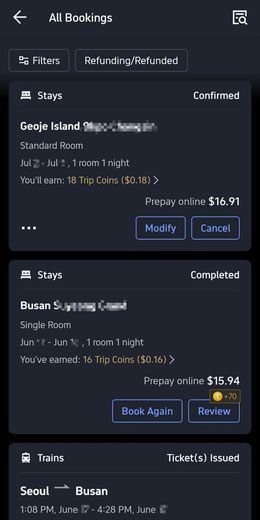
Trip.com is my absolute go-to for finding budget gems. From local trains to standard hotel rooms, I manage to book my entire route seamlessly for pocket change—often finding great accommodation for under $17 a night.
Plus, earning Trip Coins along the way helps fund future trips.
2. Keeping Everything in One Beautiful, Clutter-Free Place
I travel super light, so the last thing I want is a digital mess of confirmation emails and PDFs.
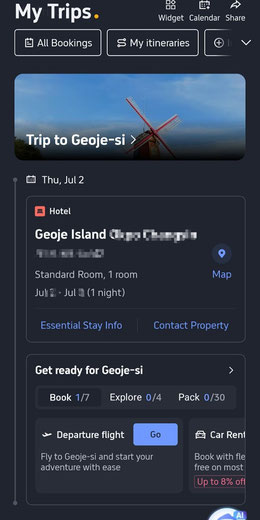
Under the "My Trips" tab, the app acts as a digital travel assistant.
It maps out check-in times, counts down the days, and even gives you an interactive checklist to make sure you’re packed and ready for the next destination.
It keeps the upcoming itinerary completely clean and organized.
3. All-in-One Dashboard for Quick Bookings
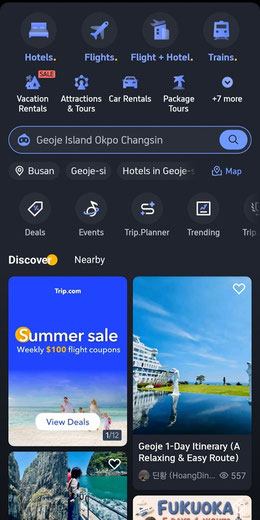
The home interface is incredibly straightforward.
Whether you need to grab a last-minute flight, find a local tour, or check out a flash sale, it’s all right there on one screen.
The main dashboard makes it incredibly easy to research new destinations, map out routes, and score weekly flight deals without jumping between dozens of tabs.
4. Need Travel Inspiration? Ask the AI
Sometimes, the best part of slow travel is arriving in a new town with absolutely no plans.
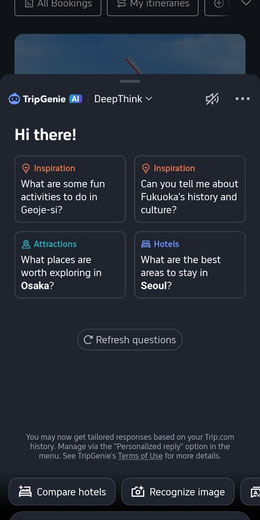
When I’m looking for local spots, historical sites, or just a quiet park to sit in, I use the built-in AI assistant, TripGenie.
It takes the guesswork out of planning and gives quick, on-the-ground inspiration on what to explore next.
You don’t need a massive budget or a complicated spreadsheet to travel the world.
By keeping your accommodation simple, your transport organized, and your itinerary flexible, you can experience incredible places on a shoestring budget.
Want to Save Even More?
Ready to start planning your own adventure?
Use my exclusive link to sign up for Trip.com and get up to 20% off your very first booking!
It is a super easy way to lock in an even better deal on your next trip.
Happy travels!